
Your year in one album.
Add your memories month by month and build your Year Album without starting from scratch in December.
What is the best photo book app for your phone in 2026?
A photo book app lets you turn the photos on your phone directly into a printed book. The real question is not only which app prints well, but which creation process fits you: make everything quickly in one go, customise every page, rely on automation, or build your album gradually throughout the year.
We compare five mobile approaches: Cheerz, CEWE, Popsa, Rosemood and Tribu. Features were checked against publicly available information in September 2026. There is no universal winner: the best app for a holiday book made in one evening is not necessarily the best one for a full year of family memories.
How we compare them: photo import, ease of use, personalisation, automatic help, the ability to continue later and how well the tool helps you organise the work over time. Short-term promotions are not a core criterion.
Photo book apps at a glance
| App | What stands out | Worth considering if… |
|---|---|---|
| Cheerz | Direct mobile creation, photo import and automatic or manual layouts. | you want to make a one-off photo book quickly from your phone. |
| CEWE | Assisted photo selection and mobile editing with flexible layouts. | you have lots of photos and want help with selection and page composition. |
| Popsa | A strongly app-first experience with Smart Albums, reminders and automated design tools. | you want to do as much as possible directly on your phone. |
| Rosemood | A strong focus on design and personalisation. | the visual finish and control over each page matter a lot to you. |
| Tribu | A Year Album built month by month, with several members able to contribute photos and text. | your real challenge is not making one book, but actually finishing a whole year album. |
If you are looking for a broader comparison of photo book services, independent of mobile use, read our comparison of the best sites to create a photo album.
1. Cheerz: for a one-off photo book made quickly on your phone
Cheerz focuses on a direct mobile flow: choose your photos, use automatic filling or arrange pages yourself, then refine text and design details.
Good fit if: you come back from a trip, wedding or weekend with a selection already made and want to turn it into a printed album with as few steps as possible.
2. CEWE: if you want more help with selection and layout
CEWE highlights mobile creation together with tools that assist with photo choice and layout. That can be useful when your camera roll contains many similar shots.
Good fit if: you appreciate help with the first round of sorting and structuring your pages.
3. Popsa: for an app-first experience
Popsa keeps many features inside the app, including automatic layouts, smart albums and tools designed to speed up the jump from camera roll to printed book.
Good fit if: you want a fast, highly automated mobile experience.
4. Rosemood: if design control matters most
Rosemood is better suited to people who want to make deliberate choices about formats, layouts, text and overall visual style.
Good fit if: you prefer more creative control rather than fewer decisions.
5. Tribu: for a Year Album that does not start in December
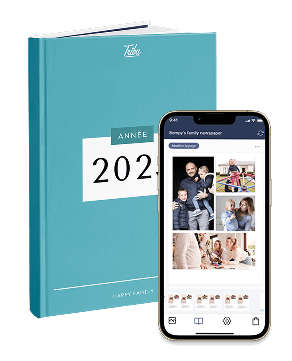
Tribu starts from a different problem. The Year Album is not something you begin only after a full year of photos has piled up. You add photos and memories month by month.
Several members of your Tribu can also add their own photos and text. One person does not need to collect everything alone at the end of the year.
Good fit if: your phone is full of photos, you keep postponing your annual album or you want several loved ones to contribute.
A faster app or a better method?
Many apps mainly make the creation session itself faster. Tribu takes a different approach by spreading the work across the year. If the December backlog is what stops you, that difference may matter more than one extra filter or template.
What should you look for in a photo book app?
Are your photos already selected?
If you already picked 80 holiday photos, a fast one-off app may be enough. If you are starting with thousands of images collected over twelve months, organising the work over time becomes much more important.
How much do you want to customise?
More formats, templates and typography give you more control, but also create more decisions. Some people enjoy that; others want the app to do more of the work.
Are you creating alone or with family?
For a family album, collaboration can change everything. If everyone can add their own photos, you do not have to collect them all first.
Is the project one-off or ongoing?
A wedding or travel album is a closed project. A year album keeps changing. For that use case, a tool built around regular progress makes more sense.
So, what is the best photo book app?
- For a quick one-off book: Cheerz or Popsa.
- For more help with selection and layout: CEWE.
- For more design control: Rosemood.
- For a family album built throughout the year: Tribu, thanks to its monthly rhythm and multiple contributors.
The best photo book app is therefore the one whose workflow matches the problem you actually want to solve.
Does your year album usually stay on your phone? Try a different approach: month by month instead of everything in December.
Discover Tribu's Year AlbumFrequently asked questions
Can I create a photo book entirely on my phone?
Yes. Several services let you select photos, build pages, add text and order directly from your smartphone.
Which photo book app is quick to use?
If your photos are already selected, look for direct camera-roll import and automatic layouts.
Can several people create the same photo book?
Yes. With Tribu, several members can add photos and text to the same Tribu.
Which app works well for a year album?
For a year album, the number of templates matters less than how the tool handles twelve months of photos. Tribu's Year Album is specifically designed to be built month by month.
Feature sources checked in September 2026: official provider information, including Popsa. Features and availability may change by country.
